
Frequently Asked Questions
What information will I see in Account Activity in the My Security Benefit app?
This activity summary summarizes the key activities for your mutual fund account(s) included for a specified time. Here is a definition for each of the items in your activity summary:
- Read More
This activity summary summarizes the key activities for your mutual fund account(s) included for a specified time. Here is a definition for each of the items in your activity summary:
- Beginning Balance —the beginning balance is the total dollar value of all your mutual fund accounts included in the summary for the beginning date chosen.
- Contributions — any contributions made to your account will be reflected here. Dividend income or market fluctuations are not reflected here.
- Distributions and Loans — any distributions or loans requested by you from your account will be reflected here. Any applicable redemption or short term trader fees are also included in the amount reflected here.
- Loan Repayments — any repayments you make for an outstanding loan are reflected here.
- Fees & Expenses — any fees debited from your account for services provided by your financial professional, or Security Benefit are reflected here.
- Gain/Loss — this is any increase or decrease in the value of your accounts over the period selected caused by the changes in the mutual funds' beginning and ending share prices (net asset values).
- Ending Balance — ending balance is the total dollar value of all accounts included for the ending date chosen.
What is multi-factor authentication?
Security Benefit requires multi-factor authentication (MFA) to help protect your online account by requiring a verification code entered by you before accessing your account from an unknown device. You are in charge of deciding how to receive your verification code whether it be by text mess
- Read More
Security Benefit requires multi-factor authentication (MFA) to help protect your online account by requiring a verification code entered by you before accessing your account from an unknown device. You are in charge of deciding how to receive your verification code whether it be by text message, email or voice call. Once you receive your verification code, enter it when asked to gain access to your account.
Security Benefit requires MFA to help protect your online account by:
- Establishing a password.
- Establishing a verification method (how you’d like to verify your sign on: text, email or call back). We recommend setting up more than one method.
When you sign in to SecurityBenefit.com with your username and password, you will then be asked to have a verification code sent by text, email or call back depending on the options you selected during your account set up.
- Establishing a password.
Where can I find information on the annuity I purchased?
Contracts are distributed through the United States mail service for annuity products. To view your account information, Click on Sign In from the top navigation.
- Read More
Contracts are distributed through the United States mail service for annuity products. To view your account information, Click on Sign In from the top navigation.
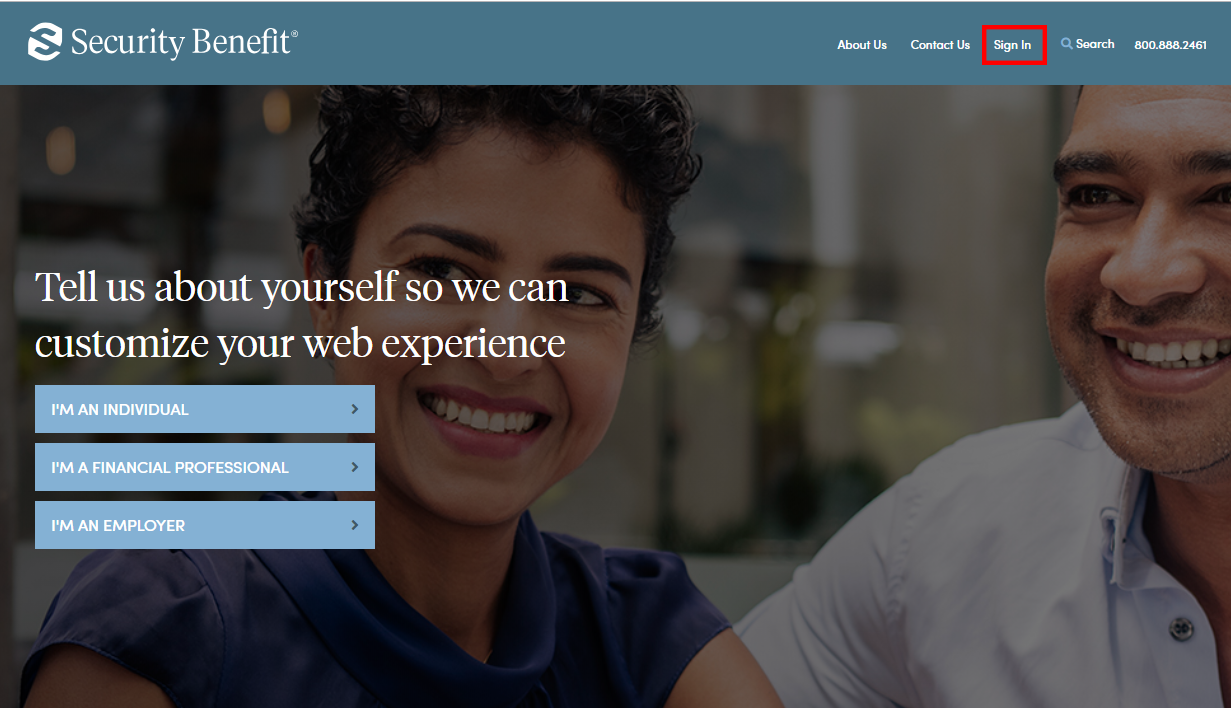
Complete the Sign In process by entering your registered Username and Password.
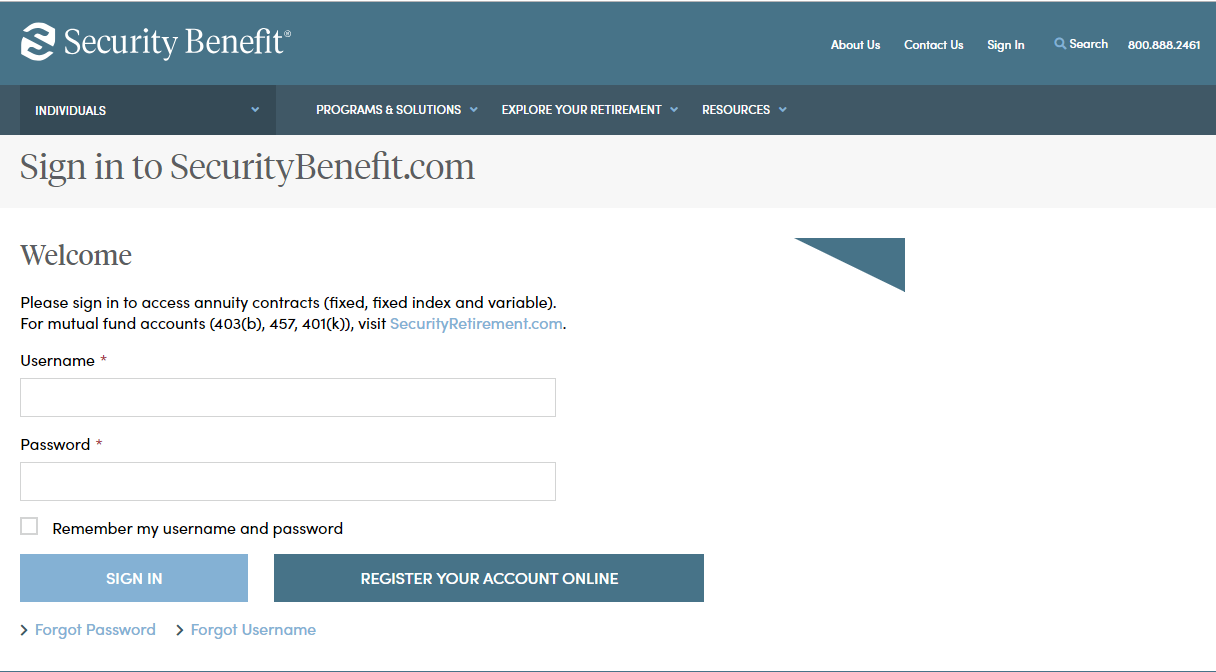
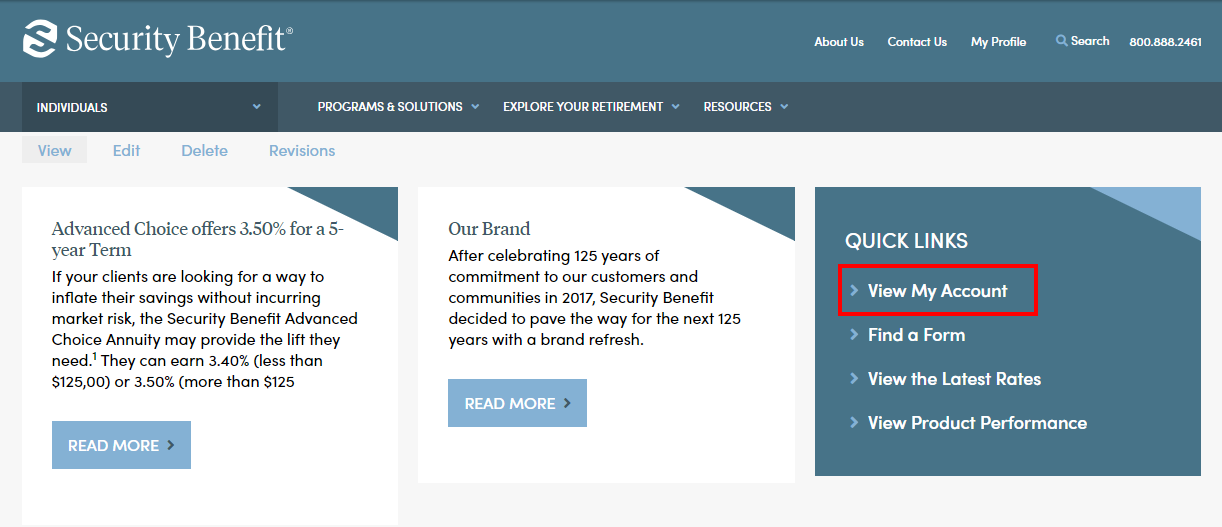
Upon successful sign in, your contract is available by clicking on View My Account located within the Quick Links box.
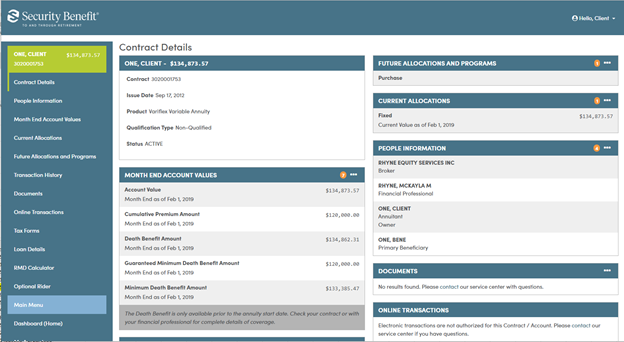
A dashboard representing the business will display. If you have multiple accounts, they can be searched upon by Account Number. Clicking on the Account within My Account, will display Account details.
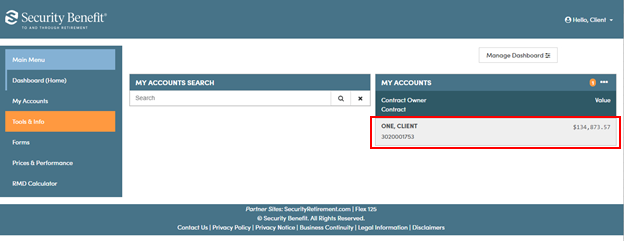
My Account data will be displayed through organized information cards. Each card provides a small snapshot of data. Most cards can be expanded by clicking on the header title or selecting the applicable Left Navigation menu to display detailed data.
For additional questions, please contact your financial professional or our Service Center at 785.438.3000 or 800.888.2461, 8 a.m. to 7 p.m. (Eastern Time), Monday through Friday.
Where can I find product performance information?
Visit our Prices and Performance page to find product performance information.
- Read More
Visit our Prices and Performance page to find product performance information.
Where do I go to set up an account?
You need to set up your account on SecurityBenefit.com prior to accessing the My Security Benefit app. After that, you'll use that Username and Password to access your information with the My Security Benefit app.
- Read More
You need to set up your account on SecurityBenefit.com prior to accessing the My Security Benefit app. After that, you'll use that Username and Password to access your information with the My Security Benefit app.
Which browsers does SecurityBenefit.com support?
SecurityBenefit.com supports the current version and previous versions of the following browsers.
- Read More
SecurityBenefit.com supports the current version and previous versions of the following browsers.
- Chrome (We recommend using the Chrome web browser.)
- Safari
- Edge
- Firefox
Which mobile devices does SecurityBenefit.com support?
SecurityBenefit.com supports the current version and previous versions of iPhone and Android devices.
- Read More
SecurityBenefit.com supports the current version and previous versions of iPhone and Android devices.
Why can't I use my financial tracker to consolidate my financial information?
In the current digital environment, multi-factor authentication (MFA) has become a necessary and common practice among financial institutions who support online account access.
- Read More
In the current digital environment, multi-factor authentication (MFA) has become a necessary and common practice among financial institutions who support online account access. In accordance with best practices, Security Benefit has also implemented MFA to maintain a high-level of online safety for your accounts. Because of the heightened security, MFA prevents financial data trackers from accessing your account. We suggest you contact your financial tracker software company to inquire how they recommend gathering account data from financial institutions who support MFA.