
Individuals
How current is the account information viewed in the App?
Generally, our system is updated to reflect new account information each business day by 11:00 p.m. (Eastern time). Your account balance will reflect this updated information.
- Read More
Generally, our system is updated to reflect new account information each business day by 11:00 p.m. (Eastern time). Your account balance will reflect this updated information. Any transactions requested during the current business day are processed overnight and will be reflected the next business day.
I have a retirement plan. What are my options for taking a loan?
You may model or request a loan by selecting the Model a Withdrawal option on the Loans & Withdrawals tab.
- Read More
You may model or request a loan by selecting the Model a Withdrawal option on the Loans & Withdrawals tab.
- Sign in to your Security Benefit account
- Access your accounts on the dashboard
- Select the Loans & Withdrawals tab
Enter your desired loan type, loan amount, payment frequency and payment choice. Please contact your financial representative or our Service Center at 800.747.3942 to discuss your loan options further.
- Sign in to your Security Benefit account
I have a retirement plan. How can I change my investment allocations?
You may change your investments in one of three ways:
- Read More
You may change your investments in one of three ways:
- Reinvest all or a part of your money: This option allows you to exchange assets from one investment vehicle to another (one to one or one to many)
- Change how things are balanced now: This option allows you to rebalance all assets into one or multiple investment vehicles within the plan (many to many, many to one, one to many, one to one)
- Change where your contributions go in the future: This option allows you to change your future investment elections. This change only applies to new contributions made to your account.
- Tax form questions:
Form 1099-R is used to report the distribution of retirement benefits from an account. If applicable, these forms are sent to participants by January 31 each year.
Form 5498 is used for reporting regular or rollover contributions and value of an IRA, Roth IRA, ESAs, SEP, or SIMPLE IRA. This form does not need to be filed with the owner's Tax Return (1040) - it simply needs to be reported. Security Benefit is only required to notify IRA, Roth IRA, ESA, SEP and SIMPLE IRA owners of their Fair Market Value. IRA contributions and rollovers are reported to the client by May 31 of each year. (The form is only issued if a contribution or rollover occurred during the year).
- Reinvest all or a part of your money: This option allows you to exchange assets from one investment vehicle to another (one to one or one to many)
I have a retirement plan. What are my options for taking a withdrawal?
You may model or request a withdrawal by selecting the Model a Withdrawal option on the Loans & Withdrawals tab.
- Read More
You may model or request a withdrawal by selecting the Model a Withdrawal option on the Loans & Withdrawals tab.
- Sign in to your account
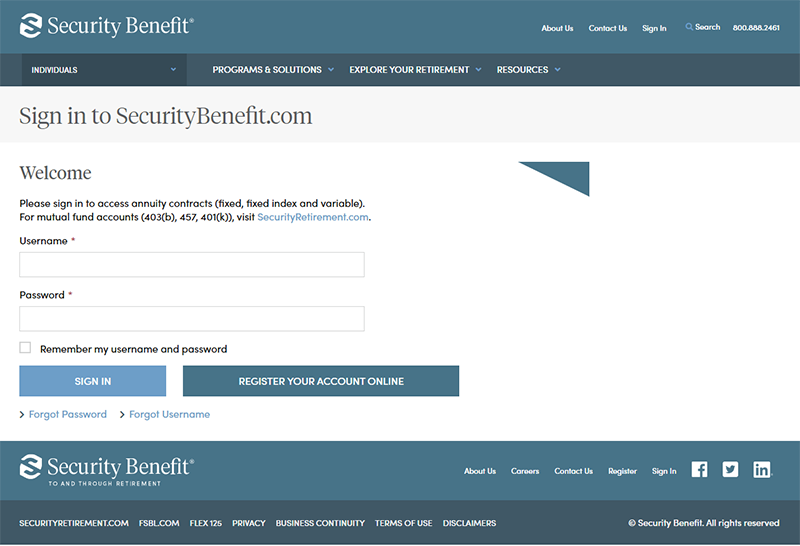
- Select mutual funds option on dashboard
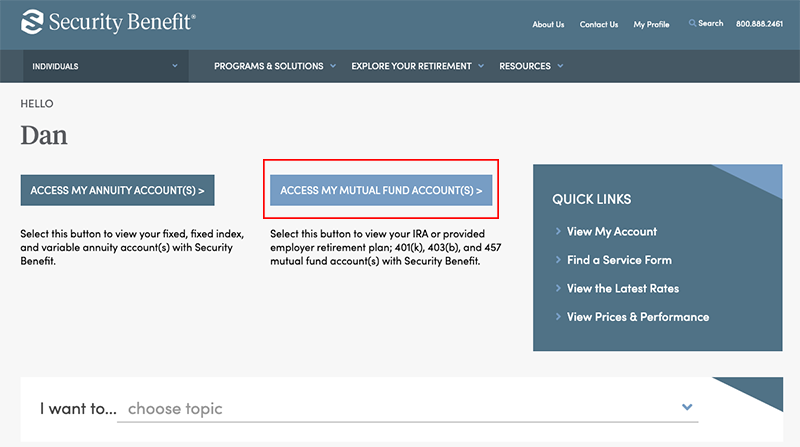
- Select the Loans & Withdrawals tab

The dollar amounts and withdrawal reasons listed on this page are subject to change based on your specific retirement plan provisions. Please contact your financial representative or our Service Center at 800.747.3942 to discuss your withdrawal options further.
- Sign in to your account
I have a retirement plan. When will I receive my 1099-R?
Form 1099-R is used to report the distribution of retirement benefits from an account. If applicable, this form is sent to retirement plan participants by January 31 each year.
- Read More
Form 1099-R is used to report the distribution of retirement benefits from an account. If applicable, this form is sent to retirement plan participants by January 31 each year.
I have a retirement plan. When will I receive my 5498?
Form 5498 is used for reporting regular or rollover contributions and value of an IRA, Roth IRA, ESAs, SEP, or SIMPLE IRA. This form does not need to be filed with the owner's Tax Return (1040) - it simply needs to be reported.
- Read More
Form 5498 is used for reporting regular or rollover contributions and value of an IRA, Roth IRA, ESAs, SEP, or SIMPLE IRA. This form does not need to be filed with the owner's Tax Return (1040) - it simply needs to be reported.
Security Benefit is only required to notify IRA, Roth IRA, ESA, SEP and SIMPLE IRA owners of their Fair Market Value. IRA contributions and rollovers are reported to the client by May 31 of each year. The form is only issued if a contribution or rollover occurred during the year.
Where can I find information on the annuity I purchased?
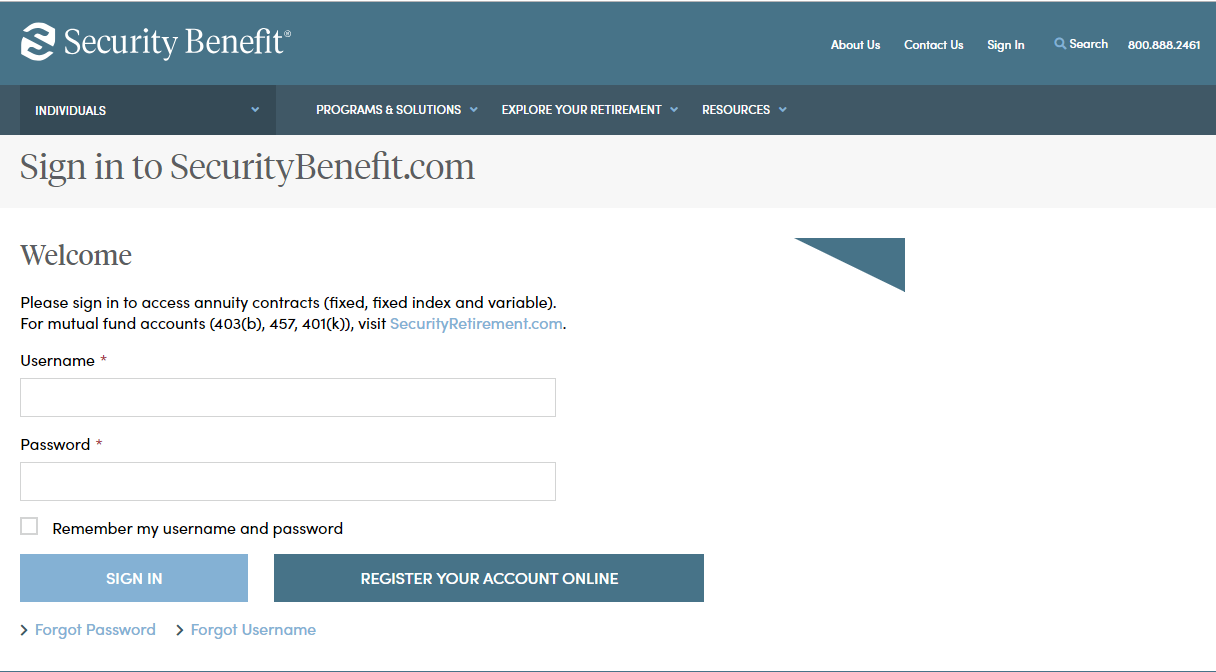
Contracts are distributed through the United States mail service for annuity products. To view your account information, Click on Sign In from the top navigation.
- Read More
Contracts are distributed through the United States mail service for annuity products. To view your account information, Click on Sign In from the top navigation.

Complete the Sign In process by entering your registered Username and Password.
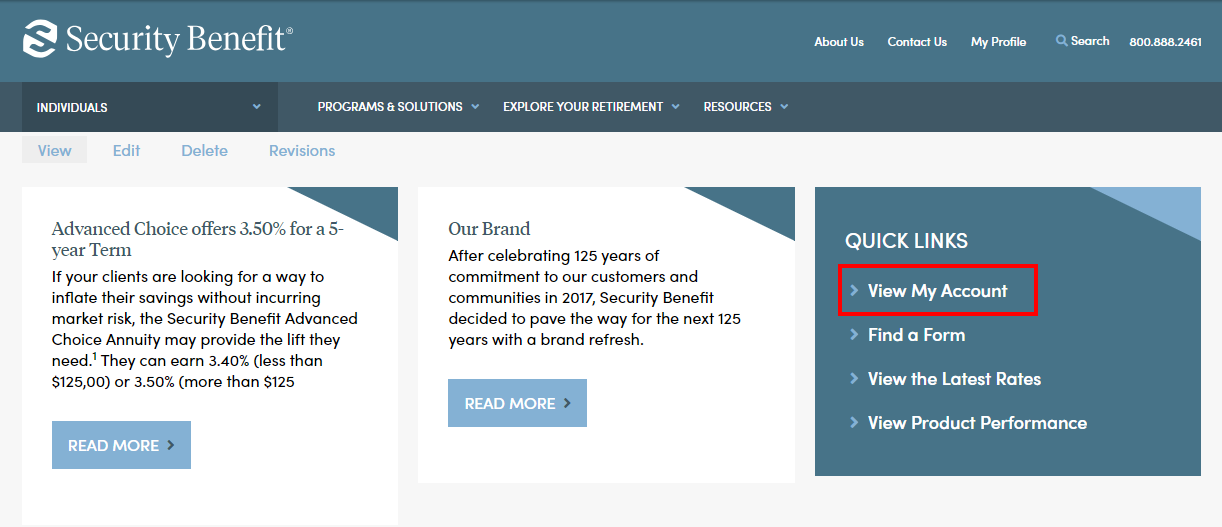
Upon successful sign in, your contract is available by clicking on View My Account located within the Quick Links box.
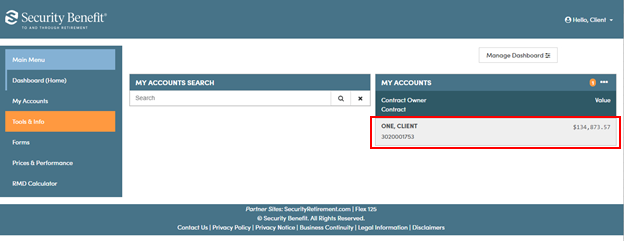
A dashboard representing the business will display. If you have multiple accounts, they can be searched upon by Account Number. Clicking on the Account within My Account, will display Account details.
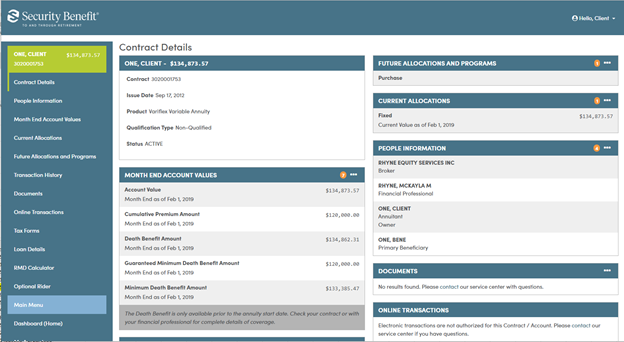
My Account data will be displayed through organized information cards. Each card provides a small snapshot of data. Most cards can be expanded by clicking on the header title or selecting the applicable Left Navigation menu to display detailed data.
For additional questions, please contact your financial professional or our Service Center at 785.438.3000 or 800.888.2461, 8 a.m. to 7 p.m. (Eastern Time), Monday through Friday.
How do I change my Systematic Withdrawal?
To add or change Scheduled Systematic Withdrawal options, you may access the Scheduled System Withdrawal for Annuity Contract or Custodial Accounts form online.
From the home page, click on Resources in the navigation to access Service Forms.
- Read More
To add or change Scheduled Systematic Withdrawal options, you may access the Scheduled System Withdrawal for Annuity Contract or Custodial Accounts form online.
From the home page, click on Resources in the navigation to access Service Forms.
Once you reach the Service Forms page, select your product to from the list on the left sidebar to display all forms for your product, including the Scheduled System Withdrawal form with instructions and mailing information.
For additional questions, please contact your financial professional or our Service Center at 785.438.3000 or 800.888.2461, 8 a.m. to 7 p.m. (Eastern Time), Monday through Friday.
How can I change my contact information?
To change your contact information, please use the appropriate Non-Financial Change Form for an annuity product (fixed, fixed index, or variable) or a workplace plan.
- Read More
To change your contact information, please use the appropriate Non-Financial Change Form for an annuity product (fixed, fixed index, or variable) or a workplace plan.
Annuities Mutual Funds / Retirement Plans Complete the Non-Financial Change Form and mail to:
Mailing Address
Security Benefit
PO Box 750497
Topeka KS, 66675-0497Overnight Mailing Address
Security Benefit
Mail Zone 497
One Security Benefit Place
Topeka, KS 66636-0001Or fax to
785.368.1772Complete the Non-Financial Change Form and mail to:
Mailing Address
Security Benefit Retirement Plan Services
P.O. Box 219141
Kansas City, MO 64121-9141Overnight Mailing Address
Security Benefit Retirement Plan Services
430 W 7th Street STE 219141
Kansas City, MO 64105-1407Or fax to
816.701.7626
How can I change my beneficiary information?
To change your beneficiary information, please use the appropriate Non-Financial Change Form for an annuity product (fixed, fixed index, or variable) or a workplace retirement plan.
- Read More
To change your beneficiary information, please use the appropriate Non-Financial Change Form for an annuity product (fixed, fixed index, or variable) or a workplace retirement plan.
Annuities Mutual Funds / Retirement Plans Complete the Non-Financial Change Form for annuity products and mail to:
Mailing Address
Security Benefit
PO Box 750497
Topeka, KS 66675-0497Overnight Mailing Address
Security Benefit
Mail Zone 497
One Security Benefit Place
Topeka, KS 66636-0001Or fax to
785.368.1772Complete the Non-Financial Change Form for workplace plans and mail to:
Mailing Address
Security Benefit Retirement Plan Services
P.O. Box 219141
Kansas City, MO 64121-9141Overnight Mailing Address
Security Benefit Retirement Plan Services
430 W 7th Street STE 219141
Kansas City, MO 64105-1407Or fax to
816.701.7626